THE HUEDLE GUIDE
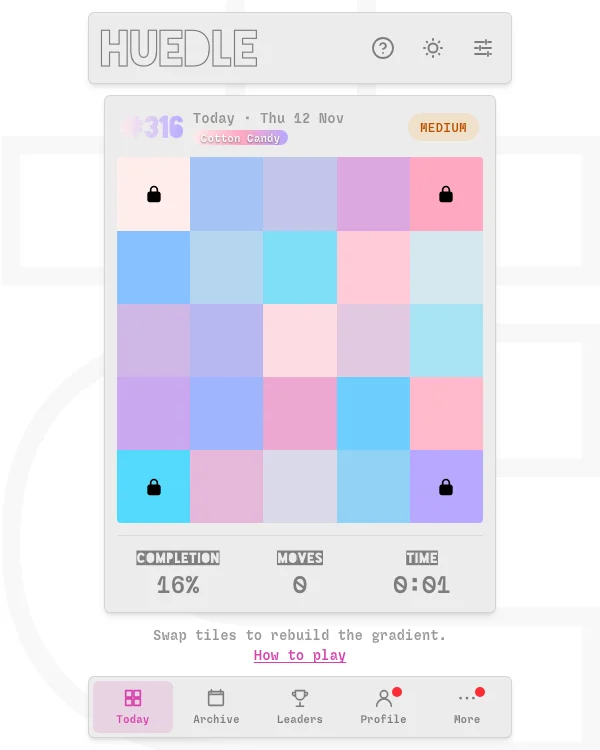
Swap tiles to rebuild a smooth gradient. Start with the fixed corners and use nearby colors to place the trickier shades.
In this guide
Huedle at a glance
What is the Huedle color game?
Huedle is a daily visual puzzle by NewBlankPage. The colors that belong to the gradient are already on the board, but many of them are out of place. The locked corner tiles establish the colors the gradient blends between. Your job is to restore every position by swapping tiles.[1]
The board uses a completion percentage, a move count and elapsed time. Completing the board is the goal. A faster time or fewer swaps is a separate challenge you can take on once you understand how the colors fit together.[1][3]
How to swap tiles and check their positions
Select Start. A padlock identifies a fixed corner that cannot be moved. Drag one movable tile onto another to swap their positions, or tap the first tile and then the second. Tap the selected tile again to clear that selection without swapping.[1]
A correctly placed tile pulses, plays a chime if sound is on and shows a dot. The dot is useful when two tiles look almost identical. The game’s completion indicator tracks the board as a whole. It reaches 100% once the gradient is restored.[1]
A practical strategy for rebuilding the gradient
Start with the edges that connect two known corners. They give you a narrower set of shades to compare than the middle of the board. Check both color family and lightness. Two blues can have similar brightness but belong in different places because one is shifting toward purple.
Once an edge looks right, use it as a reference for the neighboring row or column. Compare a candidate tile with the colors immediately above and below it as well as those to its sides. A tile that blends well in one direction can look abrupt in the other.
For an imagined blue-to-purple edge, the color next to blue usually needs only a little purple. A warmer, more saturated violet may look plausible there by itself, but the transition jumps if it sits too early. Use the context of the whole row rather than trying to name every shade.
Score, timer, daily reset and archive
The original records moves and elapsed time, and its leaderboard offers separate Score, Time and Moves views. The daily board changes at midnight UTC. Use Today for the current board or Archive for the calendar of previous dates.[1][2][3]
Pick a goal before comparing results. If you are practicing, prioritize 100% completion and learn from the swaps you reverse. If you are chasing efficiency, inspect a group of tiles before moving them. A quick solve and a low-move solve test different habits.
If you play on touch, tap-to-swap lets you compare two nearby colors without covering the destination with your finger. A display’s color or night-light settings can also make close shades harder to distinguish.
Huedle FAQ
Can I move the Huedle corner tiles?
The padlocked corner tiles are fixed. Smaller boards lock two opposite corners, and larger boards lock all four.[1]
What does the dot on a tile mean?
The dot indicates a correctly positioned tile.[1]
Can I play Huedle with touch controls?
Yes. Tap one tile, then another to swap them. You can also drag a tile to the position you want.[1]
When does the Huedle daily puzzle change?
The original daily board changes at midnight UTC.[1]
Where can I find past Huedle games?
Open Archive on the original site and choose a date from its calendar.[2]
Sources & verification
Checked · Daily Games editorial desk
- Original Huedle board and How to Play www.huedle.uk
- Official Huedle archive and daily board calendar www.huedle.uk
- Official Huedle leaderboard, scores, times and moves www.huedle.uk
Rules and access notes use the sources linked above. Examples and strategy suggestions are our editorial explanations, not guaranteed solutions. Original games can change. How we research guides.
Did this guide help?
Help us keep Huedle useful and accurate.