THE GAMEDLE GUIDE
Recognize a video game from cover art, characters or other clues. Start with the daily cover challenge, then explore the original publisher’s additional modes.
In this guide
Gamedle at a glance
What is Gamedle?
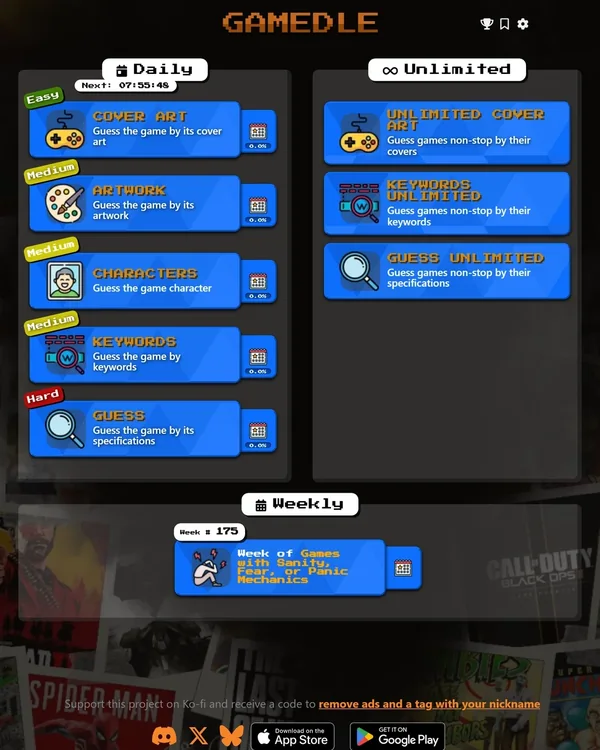
Gamedle is the video-game recognition puzzle at gamedle.wtf. Its daily menu separates Cover art, Artwork, Characters, Keywords and Guess, with the last mode using game specifications. This page starts the original daily cover-art challenge. The publisher describes Gamedle as a project made by a single developer and credits inspiration from Wordle, Framed and other guessing-game spin-offs.[1]
Each mode tests a different part of gaming knowledge. Recognizing a cover is not the same as identifying a character or interpreting a list of specifications. Choose the mode before comparing results, and keep the daily puzzle identifier with the score. A similar-looking screenshot puzzle on another site can have a different answer list and clue system.[1]
How to play the daily cover-art challenge
Study the displayed cover and search for the video game you think it represents. Submit the intended title from the suggestions, then read the result before guessing again. The official help sets the goal as identifying the cover in fewer attempts, while the interface offers Skip when the current clue is not enough. The challenge is to recognize the exact game rather than only the general series.[2]
Check subtitles, numbered sequels and closely related releases before selecting a result. A familiar character can identify a franchise while leaving several possible titles. Look at the composition, logo placement, visual era and distinctive artwork. These are observation techniques, not a promise that any particular artwork element appears in today’s cover.
What Gamedle’s red, yellow and green feedback means
The published cover-mode help gives a specific meaning to the answer colors. Red means the submitted game is incorrect. Yellow indicates the same franchise but a different saga, while green indicates the same franchise and saga. Do not treat that green relationship signal as proof that you have named the exact answer: use the game’s solved result for confirmation.[2]
Matching genres and platforms can also appear beside a submitted title when they overlap with the daily game. Those clues describe shared properties, not a claim that every game on that platform is a plausible answer. The official glossary is the best reference when the publisher’s classification of a genre, theme or game feature differs from how you normally describe it.[2][3]
After a relationship clue, narrow your next guess deliberately. If the franchise is supported, compare the likely entries rather than leaving that clue behind. If the platform and genre information contradicts your first impression of the art, reconsider the impression. A useful next guess should resolve a concrete uncertainty instead of simply naming another famous title.
Daily modes, unlimited practice and weekly themes
The original homepage provides five daily mode choices and separate unlimited options for cover art, keywords and specifications. It also lists a themed weekly set. These are clearly labeled alternatives when you want more play after the daily cover, rather than extra guesses that change your completed daily result. Follow the publisher’s countdown for the next daily selection; an exact reset timezone was not established from the published help reviewed here.[1]
The game also offers a private-room multiplayer beta. The official announcement says you can create a room, share an invitation or join with a code, and that no account is needed for this mode. Compare a shared multiplayer round with the people in that room; it is a different experience from independently solving the same daily cover.[1]
Guest play, saved progress and accessibility options
Gamedle’s account panel says guest progress is saved only on the current device, without an account backup. Signing in supports backing up progress and continuing on other devices. The interface also provides export and import tools; its displayed export warning says that only statistics are transferred, not ongoing games, and the token is active for 72 hours.[1]
Settings include sound, vibration, animations, colorblind mode and icon names. Use the options that make relationship clues easiest for you to distinguish. On a phone, check the selected title and complete clue row before submitting. A clear view of platform and genre information can be more useful than repeatedly zooming into a cover you have already inspected.[1]
Gamedle FAQ
Which daily modes does Gamedle offer?
Its current menu lists Cover art, Artwork, Characters, Keywords and Guess by specifications.[1]
Does a green Gamedle answer always mean I solved it?
The cover-mode help uses green for the same franchise and saga. Confirm the exact title through the game’s solved result rather than the relationship color alone.[2]
Can I play Gamedle more than once a day?
Yes. The official menu provides unlimited cover, keyword and specification modes, plus a separate weekly challenge.[1]
Is Gamedle progress saved across devices?
Guest progress stays on the current device. The account panel offers sign-in to back up progress and continue on other devices.[1]
Sources & verification
Checked · Daily Games editorial desk
- Gamedle — official mode menu, account information and creator credit www.gamedle.wtf
- Gamedle — official daily cover-art challenge and how-to-play text www.gamedle.wtf
- Gamedle — official game-classification glossary www.gamedle.wtf
Rules and access notes use the sources linked above. Examples and strategy suggestions are our editorial explanations, not guaranteed solutions. Original games can change. How we research guides.
Did this guide help?
Help us keep Gamedle useful and accurate.